Platform / Test Automation
Your manual test scripts are now your automation.
Write tests in plain English — or bring the manual scripts you already have. AI reads each step, sees the page like a tester, and acts. No automation code. No selectors. Nothing to maintain. Every run ends in a sign-off-ready evidence report.
If developers coordinate AI agents instead of hand-coding every behavior, why should testers still hand-code every validation?
- Write automation scripts
- Repair selectors and locators
- Maintain brittle frameworks
- Spend your time fixing tests
- Write tests in plain English
- Let AI execute and recover
- Validate outcomes by vision
- Keep a full decision record
of web test breakages are caused by element locators.
of elements go unfound by absolute XPath locators once the page changes.
AI tools pass Monday and fail Tuesday — with no app change.
Breakage causes: Hammoudi, Rothermel & Tonella, “Why do Record/Replay Tests of Web Applications Break?”, ICST 2016 — 300 application versions, 722 breakages. Locator robustness: Nass, Alégroth, Feldt, Leotta & Ricca, ACM TOSEM 32(3), 2023. Spec2RunAI holds no hard-coded selectors, so there is nothing in the script for a page change to break.
Ten layers of resilience for tests that refuse to break.
Every step runs an escalation chain. When one layer can't act, the next takes over — and the result is verified before anything is marked complete.
AI selector generation
Selectors built at runtime from the live page, not hard-coded.
Semantic validation
Confirms the element matches the step's intent before every click.
Fallback escalation
Up to three AI alternatives, each semantically validated.
Coordinate vision
Sees the element visually when selectors fail entirely.
DOM resolution
Maps the visual hit to the real clickable element.
Nearby semantic search
A keyword-ranked search finds the right target in the region.
Compound step decomposition
Splits multi-action instructions into atomic operations.
Post-action verification
AI vision confirms the expected outcome after each step.
Adaptive overlay handling
Popups and consent banners stop blocking runs.
Ambiguity + rewrite
Flags vague steps and suggests clearer wording.
Above the chain sit two more layers: selector memory makes proven runs deterministic, and self-healing turns failures into one-click fixes.
Four capabilities that work as one.
The advantage isn't any single feature — it's how they reinforce each other on every run.
Selector memory
Proven runs replay deterministically in about two seconds and cut AI cost 60–80%. Every cached click is re-validated against the step's intent before it executes.
Self-healing with integrity
Autonomous Tuning rewrites how a failed step runs against the live screen — never what it asserts. That rule is Assertion Lock, and every report proves it held. Fixes are proposed for one-click approval, so a genuine application defect still fails — on record, with the attempt documented.
Automated failure triage
Every failure arrives pre-classified — application defect, test defect, environment, or data — with confidence, evidence, and a developer-ready defect report collected in the evidence report, so review starts at the diagnosis instead of the logs.
Autonomous Explorer
Point it at a URL with a budget and guardrails; it probes paths nobody scripted and converts each finding into a runnable regression test.
How a run executes.
One agent per test case, isolated, at the concurrency of the suite. That part is how every serious platform runs now. What’s inside the worker is the part that isn’t.
Tested at 3,000 concurrent test cases in a single cloud run. Illustrative counts; the shape is the point.
One agent per test case
Each test case runs in its own AWS Lambda with its own browser inside it. Nothing is shared between tests — no session, no state, no data — so a test cannot fail because of what another test did. The suite runs at the concurrency of the suite and finishes when the longest test finishes.
There is no script in the worker
The agent reads the test case as the tester wrote it, resolves each step against the live page, marks any step that has no expected result written, and records every decision. First run interprets. Proven steps replay from selector memory afterward without a model call — deterministic where it’s earned, interpreted where it’s needed.
A failure arrives with its reason
Not a red result. The agent’s reasoning — the element it could not resolve, the check that did not hold, the alternatives it tried — and the audit trail of exactly why. The failure is diagnosable from the record alone, before anyone opens the application.
Cloud for concurrency. Local agent for reach.
Long-running tests and applications that live behind your firewall run on a local agent — the same executor, installed inside your network, no public endpoint required. Short, wide regression suites go to the cloud. Most enterprise suites use both.
No grid to provision or maintain. Concurrency is inside the engagement price — which is why the ROI calculator lists grid and infrastructure as a cost of scripted automation and not of this.
A passing run is not a verified run. Every report shows the difference.
Every finished run ends in a Run Evidence Report: what the engine did at each step, what it checked, and what the screen showed — written for the people who did not watch the run. A QA lead reviewing it, a business owner signing off UAT, an auditor months later.
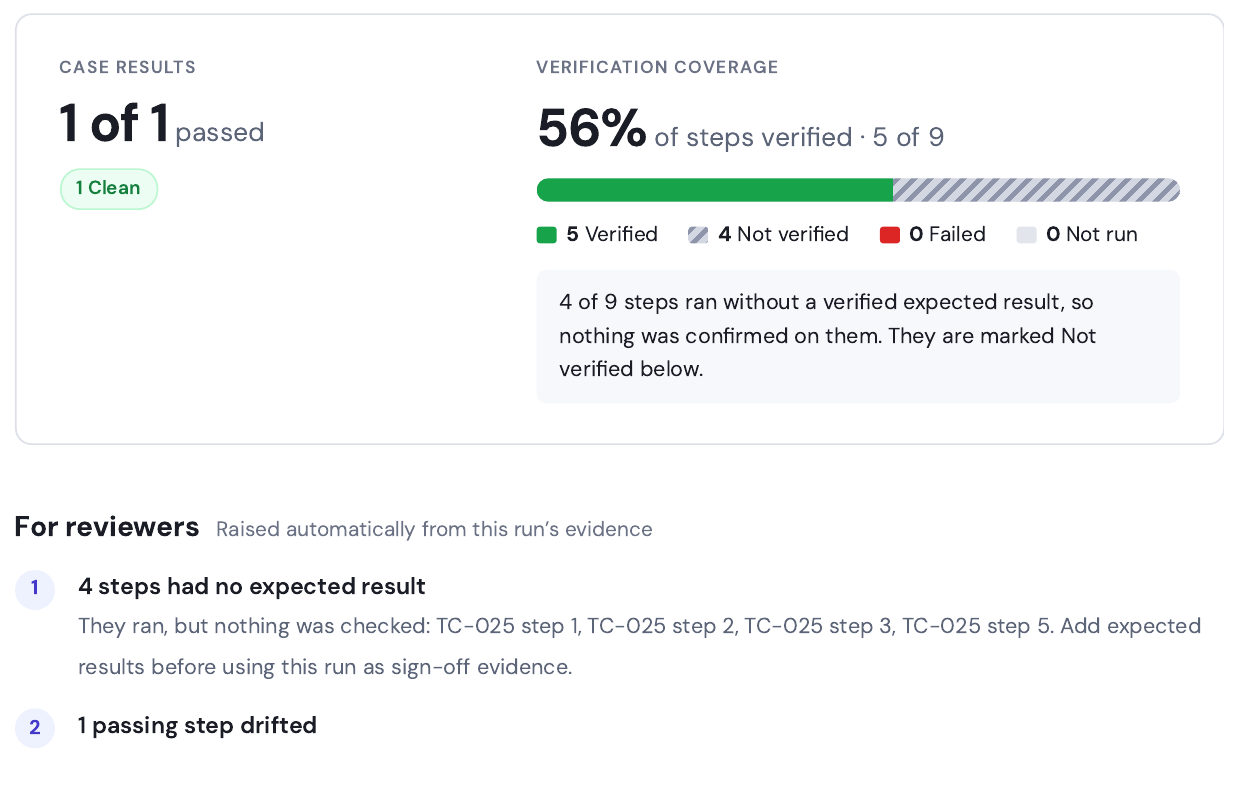
The headline number of every report: how many steps had their expected result checked and met. Each step is Verified, Not verified, Failed, or Not run, and the report says why a step was not verified.
Findings raised from the run itself, in priority order: failures, regressions and fixes since the last suite run, unstable test cases, steps with no expected result, drifted wording, and long application waits.
Download a PDF for sign-off, with screenshots for all steps, only unverified and failed steps, or none. Copy Markdown for Jira, Slack, or a pull request. Screenshots are kept 90 days; the text, states, and findings remain.
One section per test case
Every step with its expected result, what the engine observed, a screenshot with the targeted control outlined, and the result. Test cases are labeled Clean, Tuned, Failed, or Error.
Comparison with previous runs
Suite runs are compared with the same suite’s earlier runs. Each test case can carry Regressed · was PASS, Fixed · was FAIL, New in suite, and a stability score such as 50% stable · 3 runs.
Failures classified, defect report written
Each failed test case shows a classification — app defect, test defect, environment, or data — with confidence, what happened, the suggested action, and the evidence. Developer-ready defect reports are collected in Appendix B, ready to paste into a tracker.
AI provenance and integrity
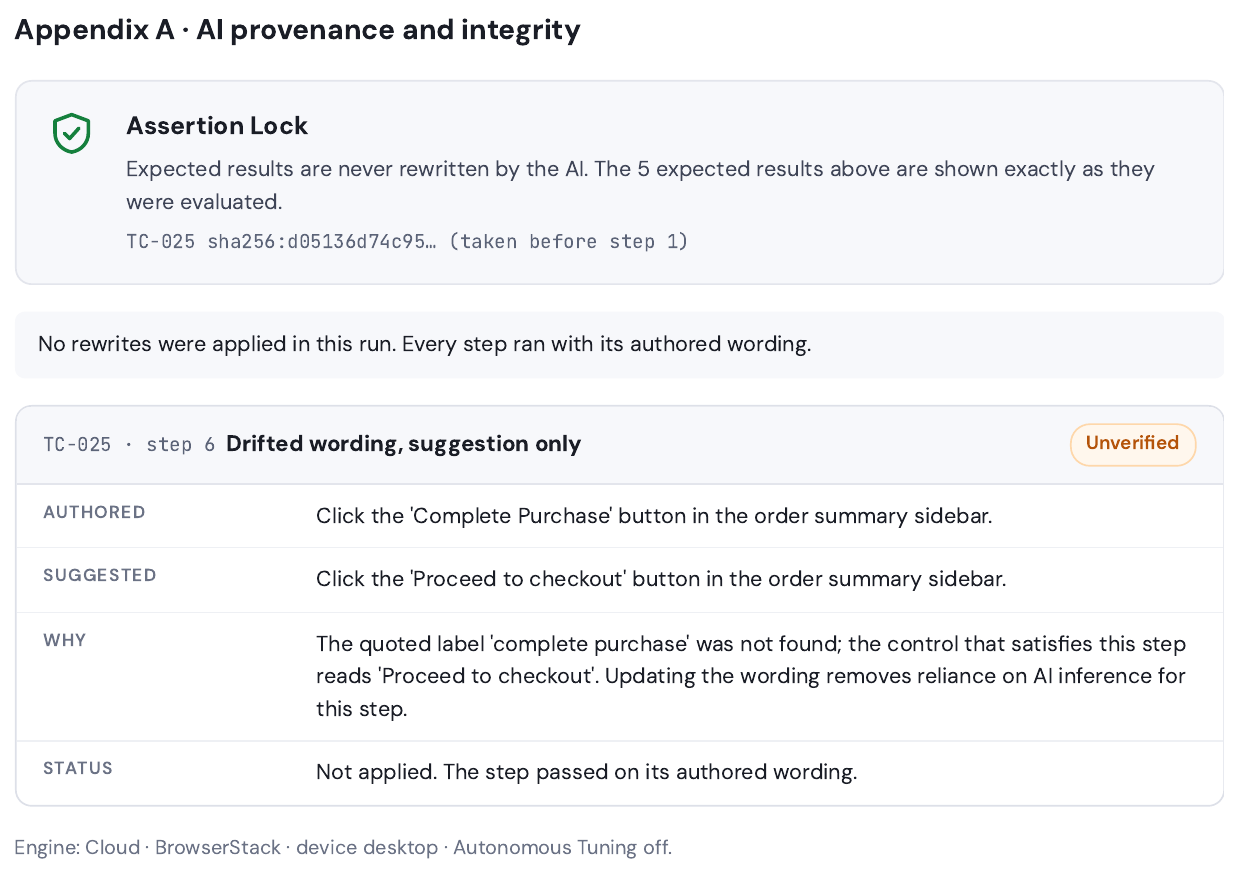
Assertion Lock: the AI may change how a step is worded; it never changes what the step verifies. Script fingerprint: a SHA-256 code of each test case as written, taken before step 1, proving which version ran. Every rewrite and drift suggestion appears with the original wording, the wording that ran, and the unchanged expected result.
An executed-by panel with signature lines for QA review and business sign-off, and the run details a reviewer needs: who started it, when, duration and how much was the application’s own loading time, engine and where it ran, browser, AI engagements used, whether Autonomous Tuning was on, and which earlier run it is compared with.
A Reports item in the sidebar lists finished runs, newest first, searchable by run ID, suite, or project. Every run page has an Evidence report button.
The properties a regulator looks for in test evidence, and why a green dashboard is not one of them: Test evidence for regulated releases →
Your manual test cases, as written, in real Chrome and Edge on Windows and macOS.
Pick a browser on the Browser card when you start a cloud run. The test cases you already have run unchanged — no scripts, no selectors, no command vocabulary, no conversion — on a real browser on a real operating system through your BrowserStack account. The engine, steps, and verdicts work exactly as on the built-in browser, and the Run Evidence Report records the exact browser, version, platform, and screen that ran.
Headless Chromium
Inside Spec2RunAI’s own cloud workers. Most runs; fastest. Labeled Cloud · AgileAI Labs in the runs list, run page, and reports.
Google Chrome, released
Evidence from a real browser on a real operating system. Windows 11 or 10, or macOS from Monterey onward; Latest, Previous, Two back, Beta where offered, or any version back to 100; screen resolution chosen per run.
Microsoft Edge, released
For the users who run Edge on Windows. Same platform, version, and screen choices; each test case in its own fresh browser, and a badge such as “Microsoft Edge 153 · Windows 11 · BrowserStack” on the run.
Your BrowserStack account
Connect your BrowserStack Automate account once, on the Secrets page. Runs use your minutes and parallel sessions; session videos stay in your BrowserStack dashboard; the platforms and versions offered come from your own plan. The access key is verified with BrowserStack before it is saved, encrypted at rest, never shown again, and used only by the cloud engine at the moment a run starts. AI engagements meter the same on either browser; BrowserStack minutes are billed by BrowserStack on your plan.
What this release does and does not do
Real Chrome and Microsoft Edge on Windows and macOS. Desktop sizes; mobile and tablet viewports run on the built-in browser. Public URLs on BrowserStack; internal applications run through the local agent, which uses its own Chrome. Slightly slower per step than the built-in browser, because screenshots travel over the network. In release checks on 27 September 2026, the same nine-step checkout test passed 9 of 9 on the built-in browser, on Chrome 153 and Edge 153 on Windows 11, and on Edge 153 on Windows 10; a 12-check engine probe passed 12 of 12 on Chrome 100, 120, and 152 and on Edge 153 on macOS Sonoma.
The AI Decision Inspector shows what the AI saw, what it chose, the alternatives it considered, and whether the step came from a fresh decision or a cached recipe — including every healing rewrite, shown side by side with the original. Enterprise AI adoption requires trust, and trust requires transparency.
Nine levels separate a script runner from an intelligent platform.
Most tools stall between levels 1 and 3. These are the capabilities Spec2RunAI, the test executor inside Spec2TestAI, brings to every run — which does your current tool deliver today?
Behind-firewall agent
Outbound HTTPS only — no inbound ports, no VPN, no IT tickets.
Cloud parallel fan-out
50 test cases finish in the wall-clock time of one.
Shadow DOM & enterprise UIs
Salesforce, Guidewire, SAP, and Oracle front-ends traversed automatically. See enterprise app support →
CI/CD pipeline ready
GitHub Actions, Jenkins, and Azure DevOps via dedicated API keys.
Choose your AI provider
OpenAI, Azure OpenAI in your tenant, or AWS Bedrock.
Regression & stability scoring
Every suite run is compared with the suite’s earlier runs: Regressed · was PASS, Fixed · was FAIL, New in suite, and a stability score per test case.
What does scripted automation really cost over three years?
Framework build, engineer salaries, maintenance, flake triage, grid infrastructure — then compare it against paying only for the runs you execute. Every assumption is editable and sourced.
Salesforce. Guidewire. The systems that break other automation tools.
Packaged enterprise applications are where scripted automation usually collapses — custom controls, nested frames, and vendor releases every quarter that shatter selector-bound suites. There's nothing to install and no object library to build: our executor is tuned to recognize and drive these interfaces, so your team writes plain English and the engine handles the rest.
Because the executor isn't built on per-application object libraries, the same plain-English approach carries across enterprise interfaces — including ones not listed here. And your existing manual test cases run as written: no required keywords, no reformatting into anyone's command syntax. See how we test enterprise applications → · How we compare to other tools →
Evidence and browsers, answered.
What does a green result actually confirm?
Every step in a Run Evidence Report is marked Verified (the expected result was checked and met), Not verified (the step ran and passed, but nothing confirmed it), Failed, or Not run, and the report states why a step was not verified — no expected result was written, the verifier could not complete, or the run predates the feature. Verification coverage, the share of steps that were verified, is the headline number of every report, so a passing run cannot hide unchecked steps. That is also the question to put to any tool you evaluate: how many of my steps were verified, and which ones were not?
Can the AI change what a test verifies?
No. Assertion Lock means Autonomous Tuning may reword how a step is performed, but never its expected result. Every expected result appears in the report exactly as it was evaluated, each test case carries a SHA-256 script fingerprint taken before step 1, and every rewrite or drift suggestion is shown with the original wording, the wording that ran, and the unchanged expected result. Stored tests change only after human approval, or an organization’s opt-in automatic application.
Which real browsers can I test on?
The built-in browser is headless Chromium in Spec2RunAI’s own cloud workers, and it is the default. The same plain-English tests can also run in real Google Chrome or Microsoft Edge on Windows 11, Windows 10, or macOS (Monterey onward) through your BrowserStack Automate account — Latest, Previous, Two back, Beta where offered, or any specific version back to 100, plus the screen resolution. Real browsers run at desktop sizes against public URLs; mobile and tablet viewports run on the built-in browser, and internal applications run through the local agent.
Does BrowserStack come with Spec2RunAI?
No. You connect your own BrowserStack Automate account once, on the Secrets page. Runs use your minutes and parallel sessions, and session videos stay in your BrowserStack dashboard. The access key is checked with BrowserStack before it is saved, encrypted at rest the same way as authenticator keys, never shown again, scoped to your organization, and used only by the cloud engine at the moment a run starts. AI engagements meter the same on either browser; BrowserStack minutes are billed by BrowserStack on your plan.
Bring your hardest application.
Break a test on purpose — then watch the platform diagnose it, heal it, and hand you the fix in one click.
Request a demo →